写真のゴースト現象が起きる原因3選と防ぐ方法をわかりやすく解説!
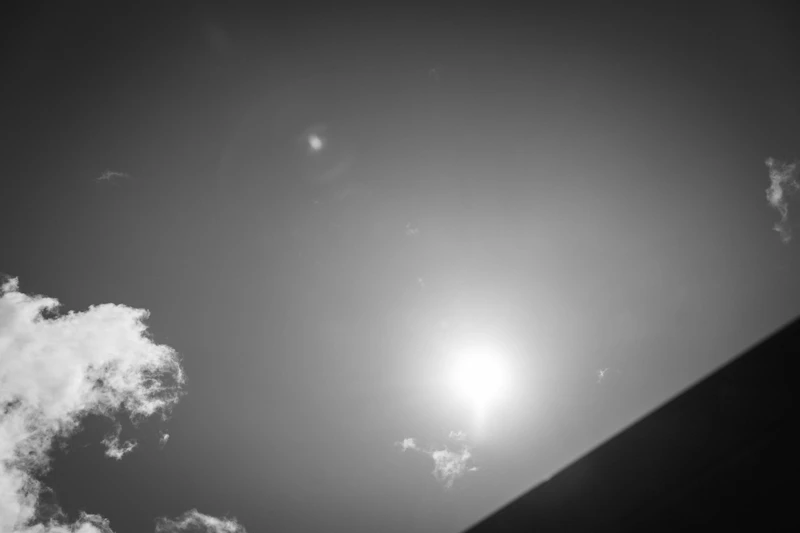
Lens flare and ghosting are phenomena that can ruin an otherwise perfect photo. In this article, I'll explain what causes ghosting in photos, how to prevent it, and how to deal with it. Once you understand it, you'll have the techniques to minimize it — and even use it creatively.
Ghosting can be prevented with a lens hood or by adjusting your shooting angle. You can also learn to use it intentionally for creative effect.
What Is Ghosting? Light Reflections Inside the Lens
Ghosting occurs when light reflects multiple times inside the camera lens, creating bright artifacts in the image. It typically appears as circular or polygonal light spots, and is most likely in backlit situations or when shooting toward a strong light source. It can happen with digital and film cameras alike, and varies in severity based on lens design and quality.
Ghosting vs. Flare

Both ghosting and flare are light phenomena that occur during photography, but they differ in nature. Ghosting is caused by light reflection; flare is caused by light scattering. Ghosting has a defined shape and outline, while flare appears as a diffuse, hazy spread of light.
They also have different triggers: ghosting occurs in backlit conditions, while flare appears when a strong light source is present anywhere in the scene. Ghosting appears as multiple distinct shapes; flare as a single spreading glow. Ghosting's position and shape are somewhat predictable; flare's are not.
How to Tell Them Apart
Look at the shape. Ghosting mirrors the shape of the light source; flare's shape is irregular and unpredictable. Color is also a clue: ghosting tends to match the light source color, while flare is often rainbow-colored or white. Symmetry matters too: ghosting is typically symmetrical around the light source, while flare radiates outward from it.
Causes of Ghosting
Ghosting is more likely to occur in these situations:
- Shooting into backlight
- Lens characteristics
- Dirty filters or lens surfaces
Backlit Shooting
Shooting into backlight is a prime condition for ghosting. When the sun or a strong light source is behind your subject, light enters the sensor directly, increasing contrast — and ghosting follows.
To minimize ghosting in backlit situations, use a lens hood to block stray light from entering the lens. Be especially careful during sunrise and sunset. That said, you can absolutely embrace backlight — placing the light source at the edge of the frame often creates compelling images.
Lens Design

Lens construction strongly influences ghosting. When light reflects between multiple lens elements internally, ghosting is more likely. High-quality anti-reflection coatings reduce this significantly.
Wide-angle lenses tend to be more prone to ghosting; telephoto lenses less so. Zoom lenses, with their complex constructions, are more susceptible. Prime lenses generally produce less ghosting. Larger-diameter lenses can also make ghosting more visible.
Aspherical lens elements help control the shape of ghosting. The type of glass used matters too. For suppressing ghosting, high-quality glass lenses are recommended.
Dirty Filters or Lens Surfaces

Fingerprints, oil, and dust on filter or lens surfaces reflect light irregularly, creating ghosting. Dust scatters light further, compounding the problem. Regular cleaning is essential.
Keep your filters and lens clean using:
- A lens cleaning kit
- A microfiber cloth
- Checking the lens surface before shooting
UV filters attract smudges and dust — be especially vigilant with these.
How to Prevent Ghosting
- Attach a lens hood
- Reposition relative to the light source
- Remove unnecessary filters
- Clean filters and the lens
- Adjust aperture (f-number)
Use a Lens Hood
A lens hood blocks stray light before it reaches the lens, reducing the reflections that cause ghosting. Use the correct hood for your lens and make sure it's mounted the right way. Petal hoods suit wide-angle lenses; cylindrical hoods are better for telephoto.
Keeping a hood on permanently is the easiest approach. Flip it backward for storage. Beyond ghosting prevention, it also protects the lens from bumps and scratches.
Reposition Relative to the Light Source

Moving where the light source falls in the frame can eliminate ghosting. Options include:
- Move the light source out of frame
- Position yourself so the light comes from behind you
- Change the angle of the light source
- Change your shooting position
When natural light isn't controllable, use flags or reflectors. Changing the time of day changes the light's strength and direction. For indoor shooting, adjusting window light can eliminate ghosting.
Remove Unnecessary Filters
Fewer filters means fewer reflective surfaces — and less ghosting. Consider removing:
- UV / protection filters
- Polarizing filters
- ND filters
- Skylight filters
- Special effect filters
If stacking filters, keep only what's necessary. The fewer filters, the less ghosting. Of course, some situations require specific filters — use judgment based on conditions.
Clean Filters and the Lens

Regular cleaning prevents ghosting before it happens. Use lens cleaning paper, mild detergent, or a dedicated lens cleaner. Wipe gently in circular motions. A cotton swab works for stubborn spots. An air blower removes loose dust effectively.
After cleaning, dry thoroughly with a clean cloth. Always cap the lens before and after cleaning to protect the surface.
Adjust Aperture (f-number)

Stopping down (increasing f-number) can reduce ghosting. Around f/8–11 tends to suppress ghosting while maintaining adequate exposure. A narrower aperture deepens depth of field. Balance against ISO sensitivity and shutter speed as needed.
Be aware that stopping down too far can introduce diffraction softness.
When Ghosting Won't Go Away
Re-check Filters and Lens
If ghosting persists, the cause may be in the glass. Check for:
- Scratches or smudges on filters
- Fingerprints on the lens surface
- Stacked filters
- Filter quality
- Lens scratches
- Internal debris or condensation
- Worn anti-reflection coating
Some lenses are inherently more prone to ghosting — confirm the lens hood is properly attached. If problems persist, consider upgrading to a higher-quality filter or lens.
Revisit the Shooting Environment
Changing the shooting environment can suppress ghosting. The most effective approach is repositioning the light source. Move from backlight to side light. Background and subject placement matters too — remove or reposition reflective objects.
For indoor shooting, adjust lighting placement or intensity. Changing the time of day changes light conditions. Weather and season affect this as well.
Changing location changes lighting conditions, which may resolve ghosting entirely. Flags and diffusers are also useful for controlling light.
Using Ghosting Creatively

Ghosting doesn't have to be the enemy. You can use it intentionally to add atmosphere and artistry.
Incorporate Ghosting Deliberately
Intentional ghosting adds a distinctive mood and visual character. Techniques include:
- Include the light source in the frame
- Embrace lens flare
- Shoot into backlight
- Use reflective surfaces
The result can be dreamlike or magical. At dusk or in city lights, use strong light sources like street lamps or the sun to create deliberate ghosting. When using ghosting intentionally, balance it carefully against your subject — too much and the subject gets lost.
Choose Scenes Where Ghosting Works
Situations where ghosting can enhance the image:
- Night scenes and light-heavy environments
- Backlit scenes
- Landscapes with water reflections
- Rainy or foggy conditions
- Sunrise and sunset
Ghosting becomes a lighting effect, creating an ethereal atmosphere. Monitor the balance between ghosting and subject when shooting intentionally.
FAQ About Ghosting
How Do I Choose Gear That Minimizes Ghosting?
Choose a lens with high-quality multi-coating. This effectively suppresses light reflections and reduces ghosting. Lenses with built-in ghosting reduction processing or internal anti-reflection designs are also excellent choices.
Choosing reputable brands and models is itself a ghosting prevention strategy. Pick a focal length suited to your shooting style. Try before you buy if possible.
Personally, using Sony G and GM lenses (SEL40F25G, SEL70200F4G, SEL2470GM2), I've almost never had a problem with ghosting.
Can Editing Software Remove Ghosting?
Completely eliminating ghosting in post-processing is difficult, but partial reduction is possible. Adobe Photoshop's Spot Healing Brush is effective for ghosting removal — it samples surrounding image data to replace the affected area naturally.
Lightroom Classic's Spot Removal tool works similarly. Software with automatic correction like Luminar AI can simplify the process. Complex ghosting may require careful manual editing. Be mindful of quality loss from heavy editing.
Post-processing can reduce it, but preventing ghosting in-camera is always the best approach. Over-relying on editing can compromise the natural look of your photos.
Summary
We've covered everything from the causes of ghosting to prevention, removal, and creative application. Ghosting is a light reflection phenomenon, but with the right approach, it can be controlled — or even turned into a creative tool for distinctive atmosphere.
Consider your gear selection, shooting technique, and post-processing options together.

Ito
Someone from somewhere. Photography lover. Father of two. Sony α7IV, α7cII, RX1R III